 +
+
Claude by Anthropic
Your creators, live in Claude.
Ask Claude how your creators are doing and get the answer as live, interactive cards: views, top videos, follower growth and payouts, straight from Shortalyze.
Creator check-inHow did our creators do in the last 30 days?
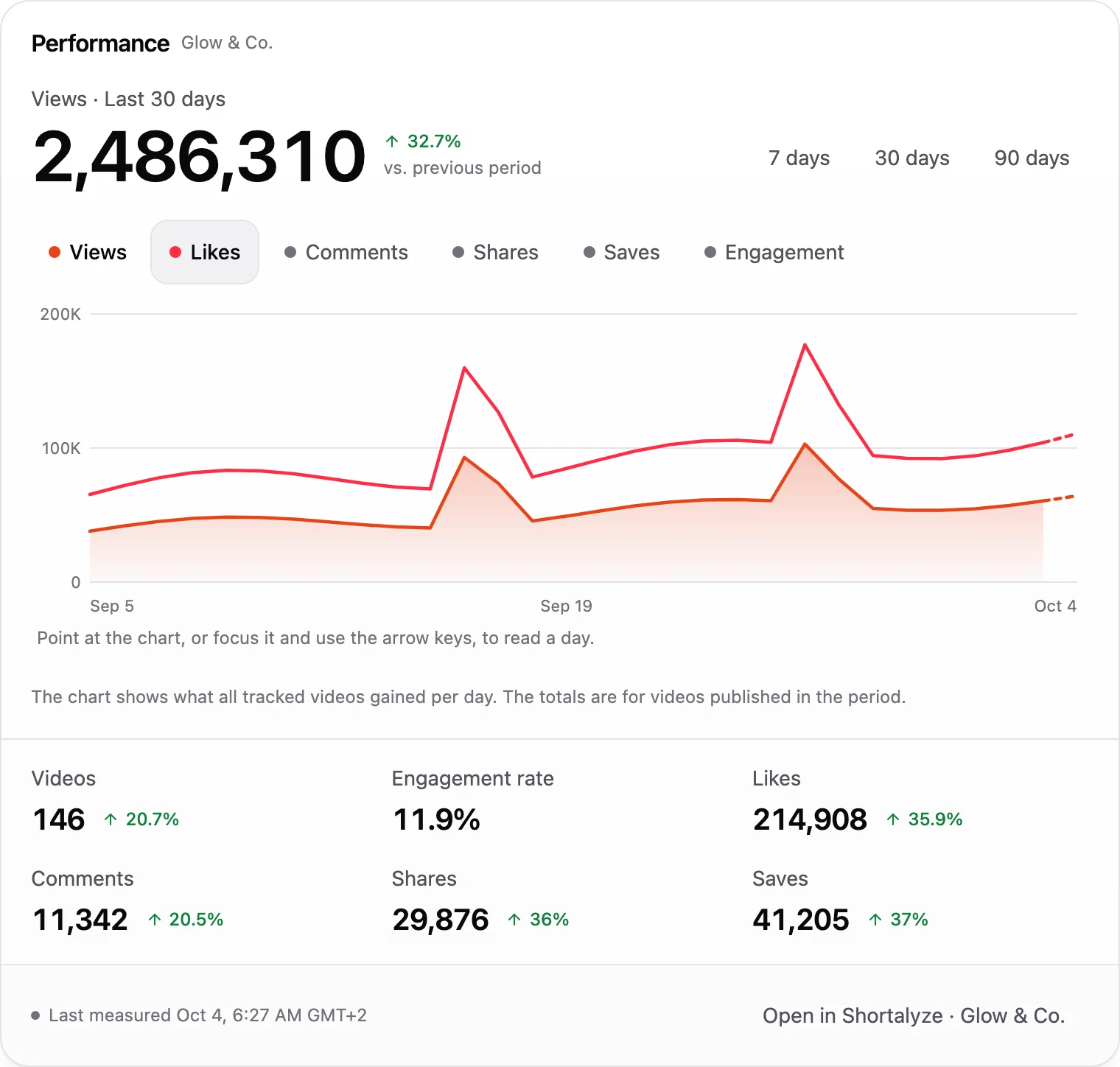
Shortalyzeget_performance_summaryGreat month: 2.5 million views from 146 videos, up 33% on the month before. Two videos took off, around Sep 16 and Sep 26.
Connect Shortalyze to Claude
Add Shortalyze to Claude once and your creators' numbers are always one question away.
- 1
Open connectors
In Claude, go to Customize, then Connectors. Choose + and Add custom connector.
- 2
Paste the address
Name it Shortalyze, paste the address below and choose Add. Then choose Connect.
- 3
Sign in and approve
Sign in to Shortalyze and approve. That's it: start asking.
- On a Claude Team or Enterprise plan, an owner of your Claude organization adds the custom connector first. You then connect it to your own Shortalyze account.
The address you need
Paste it into Claude as a custom connector. No API key needed.
https://shortalyze.com/mcpYou approve with your own Shortalyze account, and can disconnect anytime in Settings.
Claude's guide to custom connectorsWhat to ask Claude
Claude answers with live charts, leaderboards and payouts you can click through.
Know who drives your growth
Every creator ranked by views, videos, engagement or follower growth, across TikTok, Instagram, YouTube and Facebook. For any period you ask.
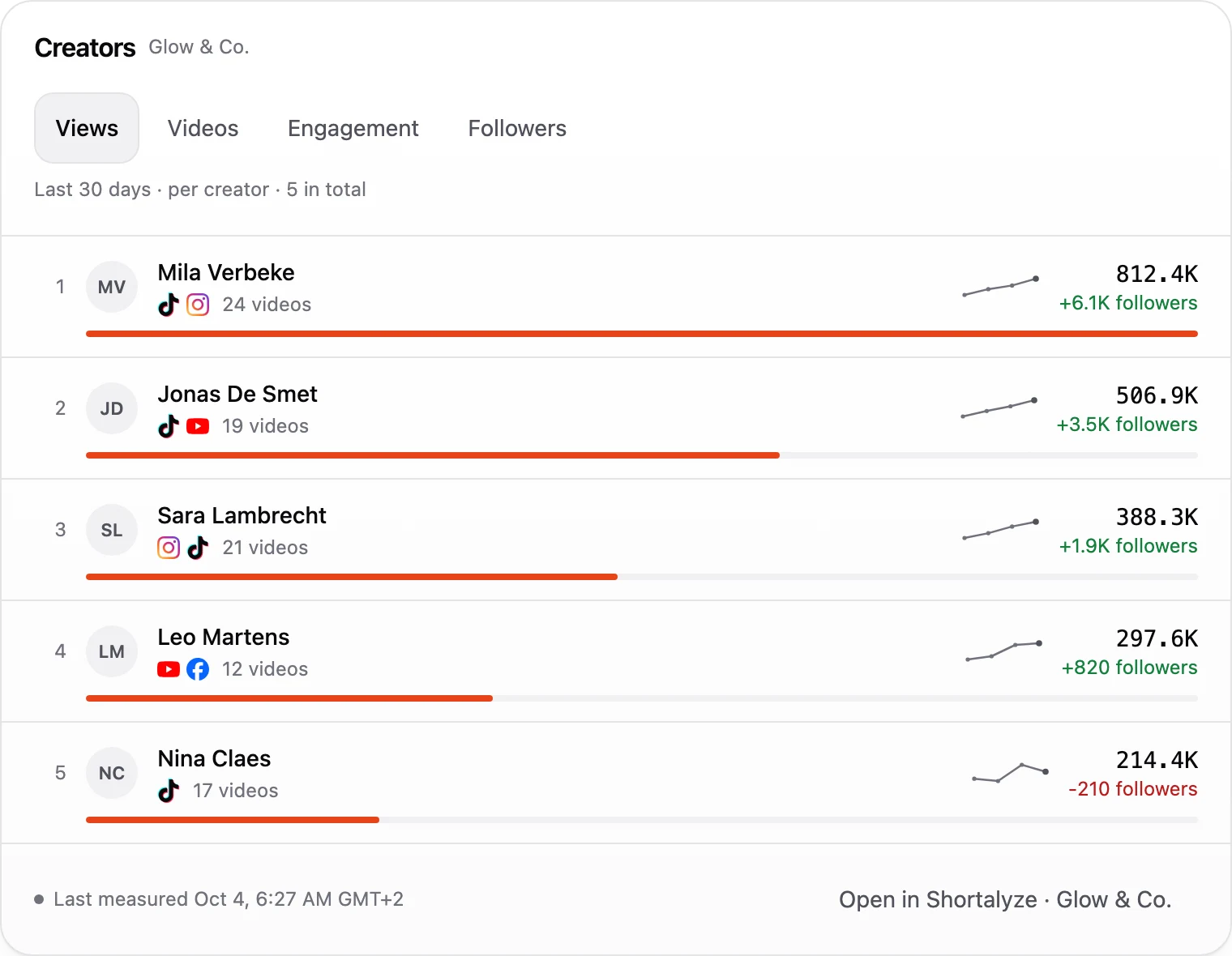
Creator check-inWhich creators brought in the most views this month?
Shortalyzelist_creatorsMila is far ahead with 812K views and 6.1K new followers. Here's everyone:
Spot the videos that take off
Your best videos of the period, with views, likes and engagement as last measured. Ask for one creator, one platform or one campaign.
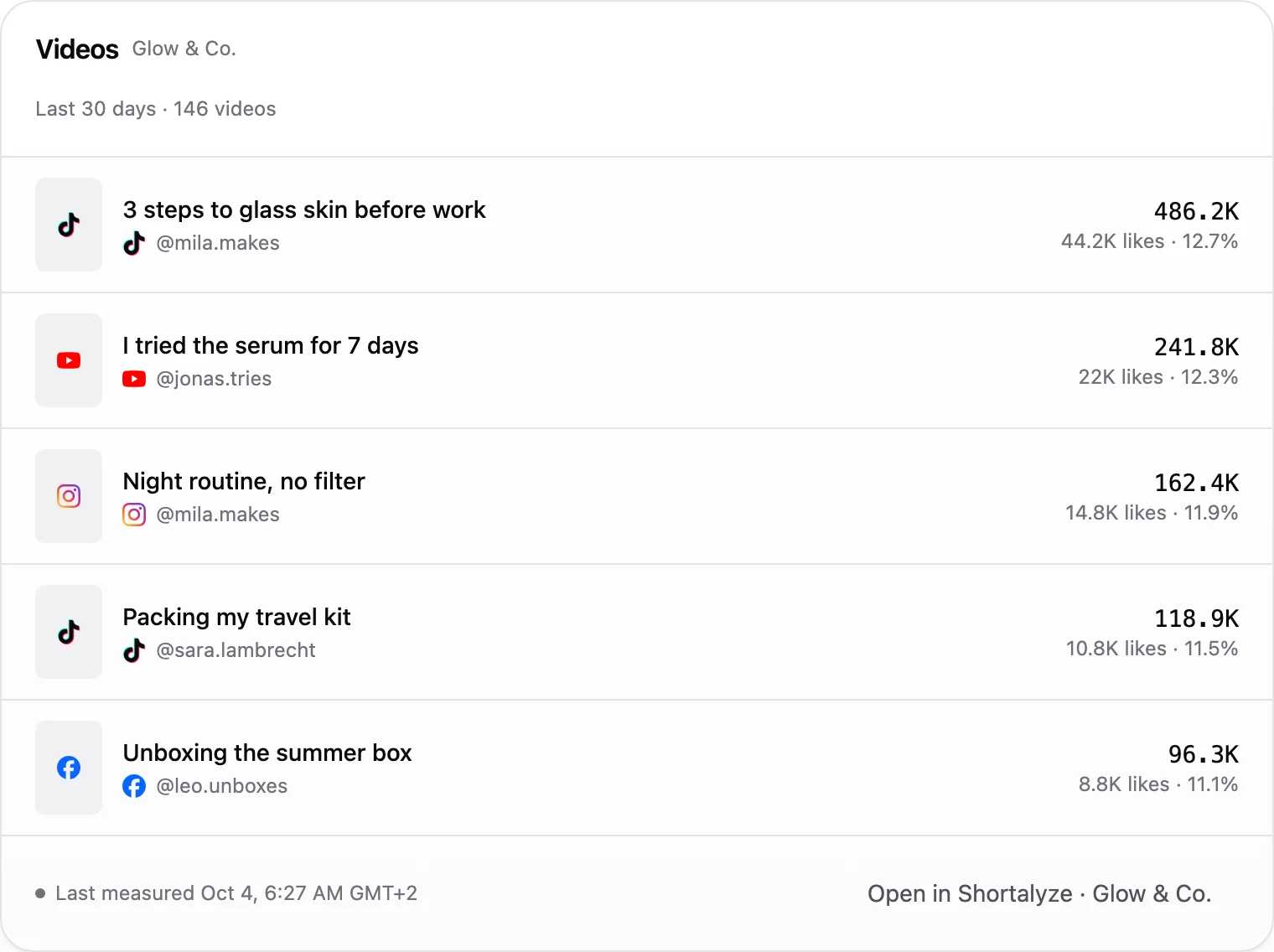
Creator check-inWhich videos took off in the last 30 days?
Shortalyzelist_videosMila's "3 steps to glass skin" leads with 486K views, 9.4 times her usual.
Follow every video, day by day
How one video grew since it was posted, measured day by day. See exactly when it took off and whether it's still climbing.
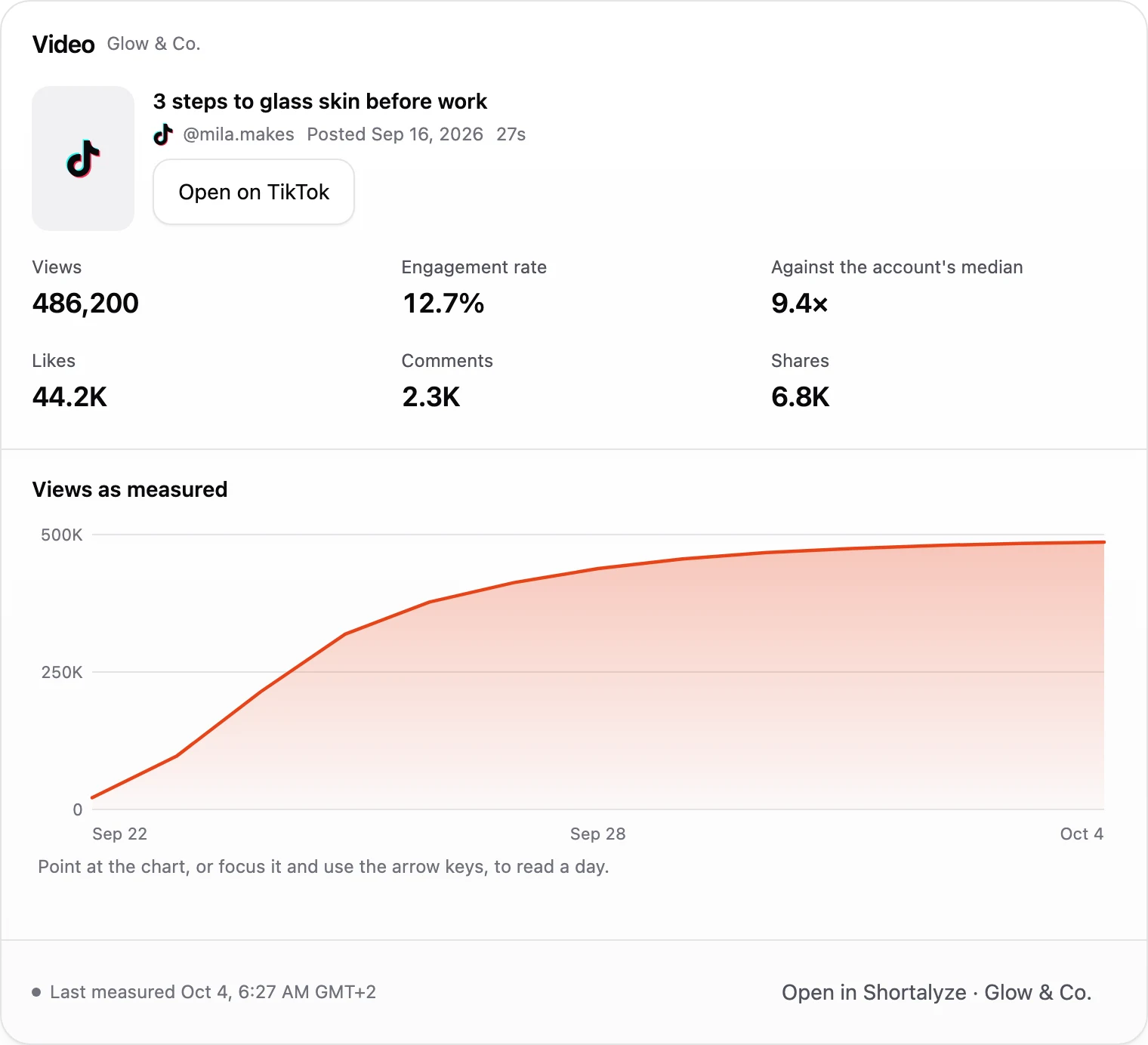
Creator check-inHow did Mila's glass skin video grow?
Shortalyzeget_videoIt took off on day two and passed 400K within a week. It's still adding a few thousand views a day.
Go deep on any creator
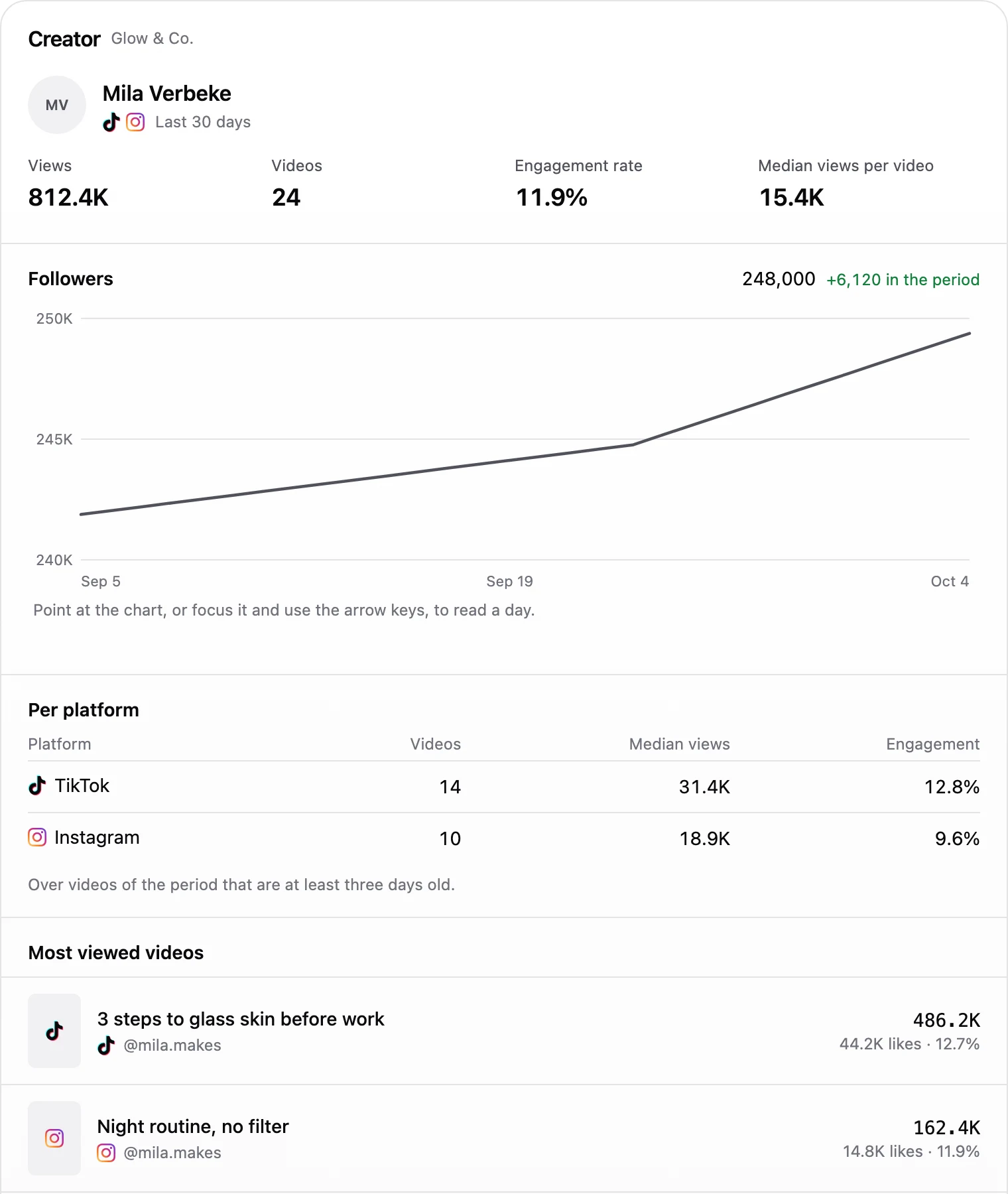
One creator's views, follower history and every platform side by side, with their usual views per video as the baseline.
Creator check-inHow is Mila doing on TikTok compared to Instagram?
Shortalyzeget_creatorTikTok is her stronger platform: a median of 31.4K views per video against 18.9K on Instagram.
Payouts, without a spreadsheet
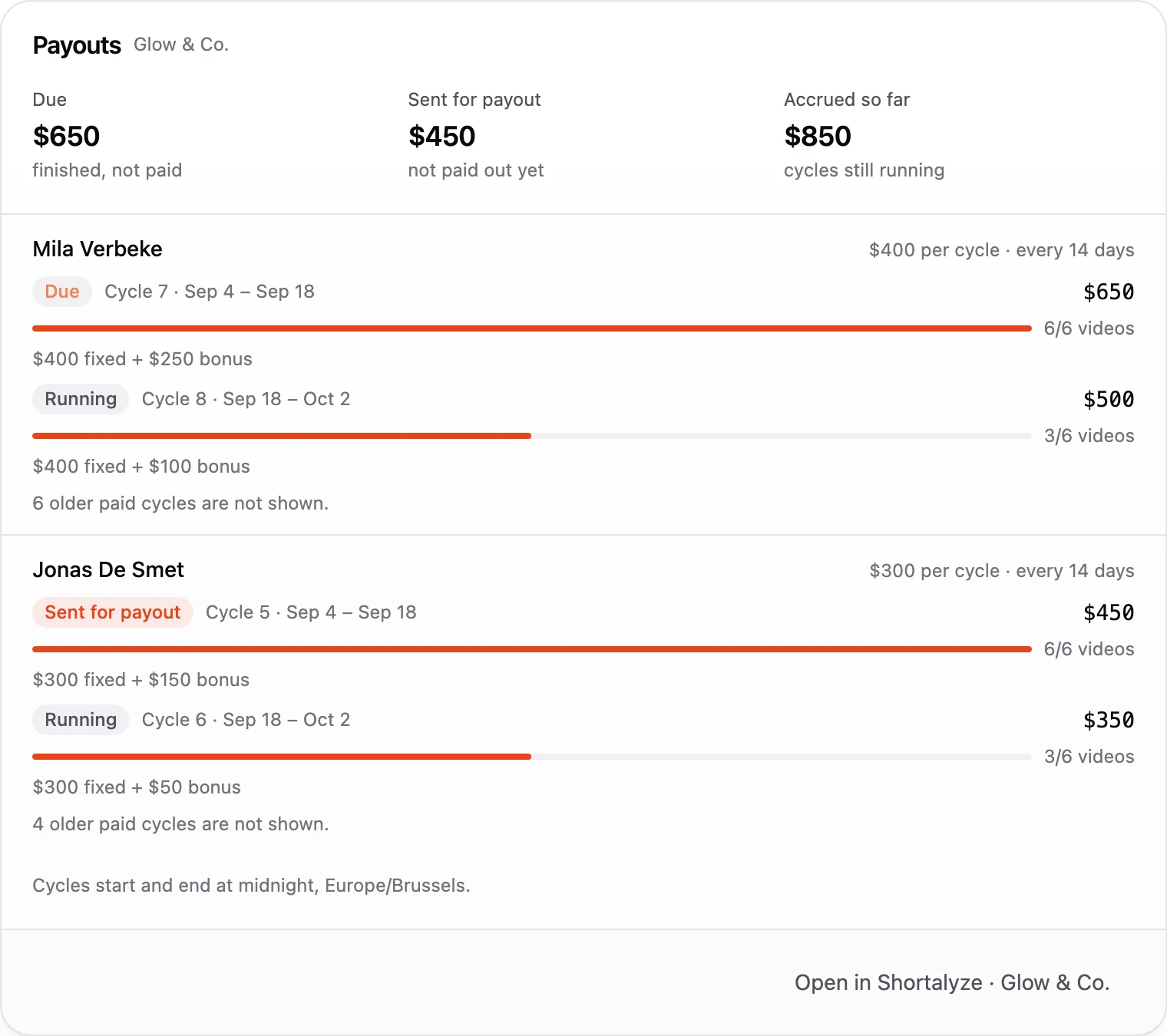
What's due, what's on its way and what's building up in running cycles, per creator, fixed fee and bonus apart.
Creator check-inWhat do I owe my creators right now?
Shortalyzeget_payouts$650 is due for Mila's cycle 7. Jonas's $450 is already sent for payout.
Your data stays yours
Your assistant can look at your numbers, never touch them.
Ask about anything
- Views, likes, comments, shares and saves
- Your creators ranked for any period
- Every video with its daily growth
- Follower growth per creator
- Payout cycles, bonuses and what's due
- Cost per creator and your credits
Safe by default
Look, never touch
Your assistant reads your numbers. It can't change or delete a thing.
You're in charge
Nobody connects your account without your OK.
Payouts stay private
Money only shows up in your assistant when you want it to.
Stop anytime
One click and your assistant is disconnected.
Use another assistant?
The same connector, the same numbers. Pick whichever you already use.


Frequently asked questions
Which Claude plans can use it?
Custom connectors work on Claude's Free, Pro, Max, Team and Enterprise plans. On Team and Enterprise, an owner of the Claude organization adds the connector first.
Why do I see cards instead of plain text?
Claude can show interactive views from a connector. Shortalyze sends its own cards for performance, creators, videos, a single video and payouts, so you can switch periods and read a chart without leaving the chat.
Does it work in the Claude desktop and mobile apps?
A connector you add on claude.ai is available in the Claude apps you sign in to with the same account.
Can the assistant change anything in Shortalyze?
No. The connector is read-only: it can't add creators, change contracts or pay anyone.
Who can connect?
An owner of the Shortalyze workspace. You pick the workspace while approving, and payout data stays off unless you switch it on.
Does it cost credits?
No. Reading your numbers through an assistant is free. Credits are only used for tracking videos.
How do I disconnect?
Open Settings in Shortalyze and disconnect the connection there. You can also remove the connector in the assistant.
Ready to ask Claude?
Start tracking your creators in Shortalyze, then connect it in a minute.